
PUBLISH YOUR BOOK ON AMAZON KDP IN 9 SIMPLE STEPS
Many people say they want to write a book “one day”, or that they have a great idea for a story. Some might even have had an exciting life which would make an interesting novel or biography to read.
A lot of the time, it’s the thought that they would never get a publishing deal for their book which stops the creative process from even beginning, but in this digital age we find ourselves, publishing a book has never been easier!
Self-publishing no longer has that stigma of poorly written and badly edited books anymore, as more and more people turn to it — especially with so many online options to do so these days. Even many famous authors began with self-publishing and hit it big! So let’s get into it:
Step One: Write your book!
Sure, this might sound strange to put in this guide on publishing, but you only get to publish if you actually finish (or start!) your book. Don’t let “one day” never arrive, make “one day” today. Lock yourself away and get writing! If you’re looking for motivation, join Twitter and get involved in the #WritingCommunity, or join in with NaNoWriMo as a way to push yourself towards your goal.
Step Two: Edit your book
This one is crucial to getting your book widely read and taken seriously (and professionally). Nobody wants to read something with many typos or grammatical mistakes as it will just come across amateurish. If you are unsure on how to go about this, here are some step-by-step instructions, or you can search for an editor on Reedsy.
Step Three: Format your book
Formatting your book is about getting it set right for the size of book you want printing, assuming you are making a print version as well as an eBook. Once you have decided what size book you want, head over to Amazon’s Paperback Manuscript Templates page where you can download a ZIP file full of preset MS Word files. All you need to do it copy your text into it and then you can work on adjusting the layout of the text and chapters to suit the new page size and margins. If you’re unsure about doing this, you can also find people to hire who can do all this for you too.
If you only want to make an eBook, check out my eBook formatting and publishing guide.
Step Four: Design your cover
Unless you can do graphic design yourself, hire a professional cover designer! We all know the saying, “don’t judge a book by its cover”, but the truth of the matter is that we all do. An eye-catching book cover is what draws someone’s attention to your book on the shelf over all of the others.
If you can create graphics yourself, Amazon provides a handy tool for generating a cover template based on your book size and page count, here.
Step Five: Buy an ISBN (optional with Amazon KDP)
Having your own ISBN will give your book the opportunity for a wider market, as you will own it and can reuse it if you publish the same book on other platforms (such as IngramSpark, Kobo etc). But if you don’t have one, Amazon can provide you with one of their own internal barcode system numbers. The plus side is that this is free, but the downside is that you can’t use this barcode ISBN outside of Amazon’s publishing system.
ISBN’s can be quite pricey, but I have shopped around and found a few places where you can buy them at a decent price:
Be aware that getting the ISBN could take up to 2–3 business days, so don’t leave it until the last moment!
- https://bookisbn.org.uk (this one starts at £30) and;
- http://www.isbnservices.com
A couple of other options, but may cost more than the above sites: https://www.isbnagency.com and http://www.isbn.nielsenbook.co.uk
An important thing to bear in mind is that if you buy one of these cheaper ISBN numbers, they will have a fixed publisher name on it as the company who provides the ISBN number, whereas the full price ISBN will let you specify the publisher name (or your own name). Also take note that an ISBN and a barcode aren’t the same thing; you need an ISBN number to create a barcode to go on your cover. Amazon will automatically place one on your cover for you based on the ISBN number provided, but if you want to publish elsewhere, you’ll need your own ISBN and barcode image.
Step Six: Create your title on KDP
Now comes the fun part: getting a step closer to having your book published and put ‘out there’! Log into your account on kdp.amazon.com and go to your “Bookshelf”. Select one of the options to add a new title. In this guide I’m focusing on a Paperback set up.
The first stage it to fill in all your book title information and author details, plus keywords and categorisation. On the next step you will be given the choice to choose a free Amazon-only ISBN, or to provide your own. If you bought one, here’s where you need to enter it.
Set your publication date if it’s a previously published book, else leave this blank if you are publishing your book for the first time. Next thing to select is your paper type and whether you need colour prints inside the book or not, and the cover type (gloss or matte). You will also need to select your trim size which should match the template you selected in Step Three when formatting your book.
Step Seven: Upload your book contents and designs
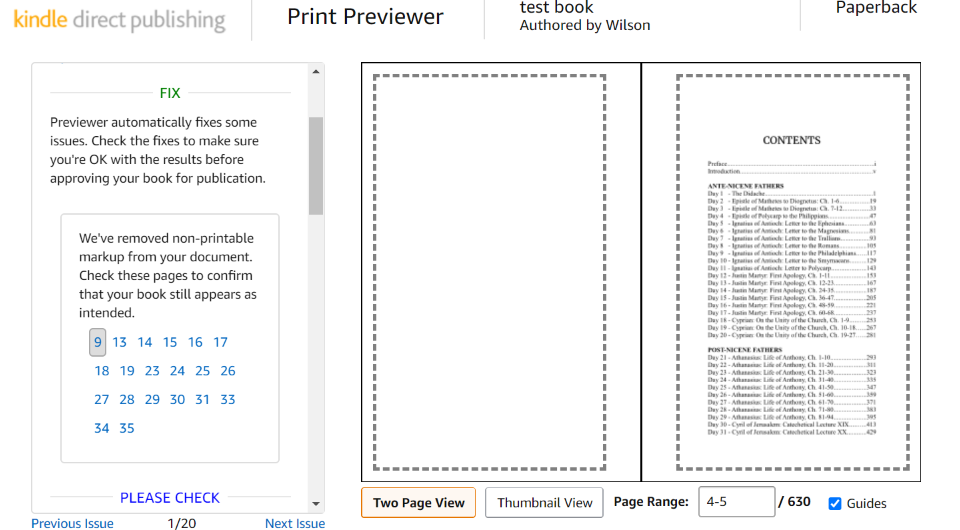
Now you can upload your manuscript and book cover graphic. Amazon also offers a Cover Creator option if you haven’t got one already, which lets you visually design a cover using KDP’s stock images. There’s a book preview option at the end of this section so you can start to get an idea of what your book will look like. This will also point out any formatting or margin errors so you may spend some time in this section if your manuscript layout wasn’t exact.
Once you’ve approved your layout, KDP will give you a summary and the base printing cost of your book.
Step Eight: Set your price
Here’s where you get to choose what you want to charge for your book. If it’s a paperback, then you can’t offer it for free as there will be a base amount that Amazon requires to cover the cost of printing it; anything after that is profit for you. Setting a price can sound like a fairly simple task, but it can prove to be quite difficult if you are unsure of the current market, what a typical book in your genre goes for (which could vary on the fame of the author), and also just simply knowing your own worth. Don’t be afraid to set a price which is as much fair to the reader as it is to yourself and the work which went into creating it.
My most recent book was 630 pages and took quite a lot of work, so I priced it at £19.99, which was based on similar works and what I felt was fair even though I almost hesitated at setting a price I thought might put people off. But to date, I’ve sold 27 copies so far and had no complaints — plus I made a good profit as well.
Step Nine: Publish!
Once you have set your price and selected your distribution (unless you have good reason, select worldwide and expanded distribution), it’s now time to publish your book! Click that button and all you need to do is wait to get an email from Amazon to say the book is live and available in their online store.
You also have the option to request a printed proof of your book that you can order and check it over physically before going live — I would highly recommend that you do this as seeing it in person gives it a whole different feel than just viewing a digital proof on a screen. When the book status does change to “Live,” you’ll also be able to order author copies at a discounted price (usually just covering the print cost and shipping).
That’s it — you have successfully created and published your own book! Congratulations! If you want to reach a wider audience, I would also recommend that you create an eBook version as well. See my other article guide on 6 Simple ways to Format and Publish your eBook.
Now you need to tell people it’s there and get onto marketing it. If you don’t have a massive amount of money stashed away for this, I also recommend my other article (and my own tried and true methods) for 7 Tips for Marketing Your Book on a Budget to help you along in this area.
Let me know if this helps you and tell me if you publish something using my guide!
Leave a comment Like Back to Top Seen 1.4K times Liked 0 times

Enjoying this? Consider contributing regular gifts for this content on Patreon.
* Patreon is a way to join your favorite creator's community and pay them for making the stuff you love. You can simply pay a few pounds per month or per post that a creator makes, and in return receive some perks!
Subscribe to Updates
If you enjoyed this, why not subscribe to free email updates and join over 186 subscribers today!
Subscribe to Blog updates
Alternatively, you can subscribe via RSS 
All email subscriptions must be confirmed to comply with GDPR.
Related Posts
Luke J. Wilson | 22nd December 2025 | Self-Publishing

📘 How to Self-Publish Your Book Easily (Even If You’ve Never Done It Before) So, you’ve written a book—maybe a devotional, a character study, or your first novel—and now you're wondering: “How do I actually publish this?” Don’t worry. Self-publishing doesn’t have to be overwhelming or expensive. In fact, I’ve refined a process over the years that removes nearly all the hassle, even if you're just starting out. Here’s my streamlined, step-by-step guide to publishing your book without needing to learn complicated formatting software or juggle multiple publishing platforms. ✅ Step 1: Write and Format Your Book Using Reedsy (FREE) 📍 https://editor.reedsy.com Reedsy is a free online book editor that handles professional formatting for both ebooks and print-ready manuscripts. Just sign up, paste in your chapters, and Reedsy will: Automatically format your book to industry standards Include front matter (title, copyright, etc.) Add back matter like About the Author or Also by this Author Export both an EPUB (ebook) and a PDF (print) version This means no need to mess around with Microsoft Word or typesetting software—Reedsy does the heavy lifting for you. ✅ Step 2: Distribute Your Book Using PublishDrive 📍 https://publishdrive.com Once your files are ready, head over to PublishDrive. This platform lets you publish your book to multiple global retailers (like Amazon, Apple Books, Google Play, Barnes & Noble, Kobo, and more) all from one dashboard. There's a free tier for one published book. Paid tiers are available if you’re publishing more titles. It helps track and manage all your sales, royalties, and reports in one place. This saves you the headache of uploading your files separately to each store and logging into five dashboards every month. ✅ Step 3: Buy an ISBN (Optional but Recommended) If you’re publishing print versions, you’ll need an ISBN. 🔗 Cheapest ISBN source for UK authors: https://bookisbn.org.uk 🔗 Cheapest ISBN source for US authors: https://www.isbnservices.com Here’s what you need to know: Reedsy and PublishDrive allow ISBNs. Buying from ISBN Services is cheaper and will label your book as independently published. This site includes the barcode graphic, which some ISBN sellers charge extra for. If you want to list under your own publishing imprint name, you'll need to buy from Nielsen UK (more expensive). In short: Book ISBN - UK only: affordable ISBN with the barcode graphic for (£40 at the time of writing) ISBN Services – USA only: affordable and includes the barcode graphic (around $22 at the time of writing) ISBN Agency – $34.99 for one ISBN (at the time of writing) Nielsen UK – ideal if you want it listed under your own UK imprint Owning your ISBN also makes your book appear more professional and gives you greater distribution flexibility. 💡 Tip: If you're only using Amazon KDP, they provide a free ISBN, but it can only be used on Amazon. ✅ Step 4: (Optional) Use Amazon KDP for Amazon-Only Publishing 📍 https://kdp.amazon.com If you want to publish only to Amazon, you can skip PublishDrive and go direct. But be warned: You’ll need to handle your own formatting (or use a tool like Reedsy first). The process can be more manual and time-consuming. KDP does offer free ISBNs, but you won’t be able to use them elsewhere. I personally recommend using Reedsy + PublishDrive for wider reach and less hassle. ✅ Step 5: Get Early Reviews with Booksprout (ARC Tool) 📍 https://booksprout.co Want to launch your book with reviews already in place? Set up an ARC (Advanced Reader Copy) campaign using Booksprout. It allows you to: Invite beta readers or early reviewers Distribute copies securely Gather early reviews for Amazon and other platforms This boosts visibility when your book goes live...
Luke J. Wilson | 21st January 2022 | Self-Publishing

So you've about to publish your book on Amazon, congratulations! That's it, right, nothing more to do now? This is just the beginning. Now is the time to make sure that your keywords and description are really on point and help drive your organic sales. I have recently discovered a tool called eGrow which lets you reverse lookup keywords from other books on Amazon, which you can also check per marketplace too (i.e. the .com or .co.uk Amazon marketplaces). You just paste a product URL into the dashboard, and it will bring up a list of results you can filter and look through to see what people are searching, and how much the keyword is worth, that are relevant to your book. egrow.io interface As you can see from the image above, it can potentially show you lots of good information to help guide you in what to include in your keyword section of the book details page. What I have done is search for a few books which are in a similar area and genre to mine, looked at the top keywords and then copied them to my keyword section on the KDP setup. KDP Book Details Page Another thing you can consult to make sure you are getting the keyword right and not adding any which will get your book pulled from the site, is the Make Your Book More Discoverable with Keywords (amazon.com) guide from Amazon. This page lists all the guidelines you must follow, as well as best practices for creating keywords for your book, such as: Combine keywords in the most logical order. Customers search for "military science fiction" but probably not for "fiction science military" Use up to seven keywords or short phrases. Keep an eye on the character limit in the text field Before publishing, search using keywords you’re considering on Amazon. If you get irrelevant or unsatisfying results, make some changes. When searching, look at the suggestions that appear in the "Search" field drop down Think like a reader. Imagine how you'd search if you were a customer Choose your marketplace Another thing to keep in mind is your primary marketplace. If you've published already and have some sales statistics, you can filter these by marketplace to see where you got the most sales. Even though I am a UK author, the majority of my sales have been to America through the Amazon.com marketplace, selling almost triple to the Amazon.co.uk marketplace! So with this in mind, I have published my recent book with the primary marketplace set to "amazon.com", as this is where Amazon and its algorithms etc. will push it more for end users searching for similar books. Primary Marketplace settings Hopefully all of this will give you a heads up of what you can do to help your book rank organically. I have just started this on my new release, so alongside some Facebook Ads I will be doing, I hope it will pay off! Let me know how you have had success with your books in the comments below! ...
Luke J. Wilson | 22nd June 2020 | Self-Publishing
So you’ve recently written a book. Great! Maybe you’ve published it online as a paperback already, but now you want to get it into the hands of those with eReaders and Kindle devices. Seems straightforward enough, right? Well, kinda. An eBook isn’t quite as simple as just handing out a PDF version of your book. I mean, you can do this, but it’s not very optimised for reading on a mobile device via the various eBook apps. It’ll require a lot of pinching-and-zooming on smaller screens! Your eBook Options If you’re publishing/published via Kindle Direct Publishing (KDP), once known as CreateSpace, then there is an automatic option for you in your author dashboard. It’ll take your uploaded manuscript and attempt to rework it into a formatted Kindle version. Related: 9 THINGS TO CONSIDER BETWEEN INGRAMSPARK & KDP Personally, I’ve found this method to be rather hit-and-miss leading to various formatting issues and messy internal code (that makes up the eBook), leading it to get rejected on other eBook publishing websites (I’ll come to these later). Other online publishers offer similar automated methods, and there are even extensions you can get to plug into OpenOffice or MS Word that’ll enable you to export to ePub format. But there is a way around this using a variety of tools and websites that can help, and using these methods you can create an eBook which will be accepted everywhere and work smoothly on all devices! As I’ve only had experience with KDP’s automation, I’ll be explaining my methods from that perspective, and the end result will be a working Kindle (MOBI) and ePub formatted eBook. Step One: Get your Kindle file The first thing to do will be to upload your manuscript to KDP if you haven’t already. Once Amazon has processed it all, you’ll have the option to download your book as a Kindle preview MOBI file. Doing it this way first will take out the bulk of the work you will need to do in creating a working eBook version of your manuscript. The Kindle eBook preview page in the KDP Dashboard Step Two: Convert your MOBI file Once this has downloaded, head over to mobi2epub.com where you can upload your MOBI file and have it converted into the ePub format. Other online converters are out there, I’ve just found this one to work well. Step Three: Validate Your ePub File Now that you have an ePub file, you will need to validate it to make sure there’s no extra bits of code in there or bad formatting which will get your eBook rejected by publishers like iBooks. Many places have very strict guidelines on how an eBook must be formatted for acceptance, which can be frustrating if you don’t know how to fix these. Now, head on over to ebookit.com/…/epub-validator and upload your ePub file. Depending on the file size (and your connection speed) this will take a moment, plus processing time. When it’s complete, you will most likely see the following message with similar errors: Error messages from a failed ePub file This may look daunting, but it’s not as bad as it seems! Now you know exactly what you need to look for to get your eBook in order as the error message tells you which file the error is in (eg: part0002.html) and also it tells you the line and column number in the brackets at the end of the filename with the error. For clarity, that last error in the screenshot above is telling you that in file part0002.html on line 12, the error begins 69 characters across and is something to do with the id attribute. Step Four: Cleaning Up Your eBook This is where it can get a bit technical; and this step will be easy or difficult depending on how familiar you are with editing basic HTML code. You might be thinking, ‘aren’t websites made with HTML?’ — and you’d be correct! ePub files are basically very simple, self-contained websites using simple HTML and CSS styling. If at thi...
Luke J. Wilson | 23rd October 2019 | Self-Publishing

If you are about to self-publish your book but are unsure about which platform to use, have a read through this list of things I’ve learnt over the last year or so. I initially published my book on Amazon CreateSpace (now renamed as Kindle Direct Publishing) as that’s all I was familiar with at the time back in Dec 2017, but have since found many other platforms which are also similar. For the sake of this post, I am concentrating on KDP vs IngramSpark as I was looking into, and since have, published my book through IngramSpark. One of the best points between the two is that Ingram supplies many bookshops across the world. I’m in the UK and am trying to get my book in to the local Christian and indie bookshops. No one (or very few) bookshops will touch Amazon/CreateSpace, but through Ingram I potentially can get my foot in the door. While KDP is completely free, there are a few things to note about using IngramSpark alongside it. Let’s have a look at a few key differences to be aware of: 1. UPFRONT COSTS Ingramspark has an upfront cost, whereas KDP is free — but the pros of using IngramSpark outweigh the cons of any costs, in my opinion. Prices as of 21st Oct 2019 are — eBook: $25 (£19.23), Print: $49 (£37.69) See the full costing here: http://www.ingramspark.com/features Along with a title set up fee (above), there is also a cost to making revisions after you have submitted your book for distribution. Any changes to cover design or manuscript will incur a $25 fee on IngramSpark, whereas KDP is totally free. So the major con is the cost of using IngramSpark over KDP, but some of the main pros to consider include: Opportunity to get into brick-and-mortar bookshops The ability to create hardbacks, which Amazon doesn’t have. They also have UK distribution so you can order your own book at an Author discount with fair postage prices, this will like pass onto retailer who may buy your book on wholesale. Since CreateSpace became merged with KDP, they also now have UK distribution for ordering your own books too, which they didn’t have before (it was all US based). 2. ISBN NUMBERS KDP offers you a free ISBN for your book, but with the limitation that it’s only applicable to Amazon. On top of that, the KDP assigned ISBN lists them as the publisher, which is typically what you want to avoid when self-publishing and aiming to get into bookshops as many retailers don’t look favourably upon “CreateSpace publishers” listed on the ISBN. IngramSpark offers a placeholder “ISBN” which you can use while sorting out your cover files and manuscript in their author portal, but you can’t go to print with it and will require a real ISBN number to publish your book. On pro of the KDP platform is that you can publish eBooks without being required to buy a new ISBN as Amazon will assign it a number using its own internal system. IngramSpark will require a separate ISBN for print and eBook. Many sites sell ISBN’s at a high cost — often around £80+ (around $100 USD). I’ve found a couple of websites that sell them a lot cheaper and which are still compatible with KDP and IngramSpark (I contacted them to make sure, though double-check their FAQ pages in case anything changes). Be aware that getting the ISBN could take up to 2–3 business days, so don’t leave it until the last moment! Here’s a couple of cheaper ISBN providers you can buy from: https://bookisbn.org.uk (this one starts at £30) and; http://www.isbnservices.com A couple of other options which may cost more: https://www.isbnagency.com and http://www.isbn.nielsenbook.co.uk One thing to note is that if you buy one of these cheaper ISBN’s, they will have a fixed publisher name on it as the company who provides the ISBN number, whereas the full price ISBNs will let you specify the publisher name. 3. YOU’LL NEED A DIFFERENT ISBN PER BOOK VERSION/TYPE On an ISBN-related note, this is worth ...
Luke J. Wilson | 22nd December 2025 | Self-Publishing
📘 How to Self-Publish Your Book Easily (Even If You’ve Never Done It Before) So, you’ve written a book—maybe a devotional, a character study, or your first novel—and now you're wondering: “How do I actually publish this?” Don’t worry. Self-publishing doesn’t have to be overwhelming or expensive. In fact, I’ve refined a process over the years that removes nearly all the hassle, even if you're just starting out. Here’s my streamlined, step-by-step guide to publishing your book without needing to learn complicated formatting software or juggle multiple publishing platforms. ✅ Step 1: Write and Format Your Book Using Reedsy (FREE) 📍 https://editor.reedsy.com Reedsy is a free online book editor that handles professional formatting for both ebooks and print-ready manuscripts. Just sign up, paste in your chapters, and Reedsy will: Automatically format your book to industry standards Include front matter (title, copyright, etc.) Add back matter like About the Author or Also by this Author Export both an EPUB (ebook) and a PDF (print) version This means no need to mess around with Microsoft Word or typesetting software—Reedsy does the heavy lifting for you. ✅ Step 2: Distribute Your Book Using PublishDrive 📍 https://publishdrive.com Once your files are ready, head over to PublishDrive. This platform lets you publish your book to multiple global retailers (like Amazon, Apple Books, Google Play, Barnes & Noble, Kobo, and more) all from one dashboard. There's a free tier for one published book. Paid tiers are available if you’re publishing more titles. It helps track and manage all your sales, royalties, and reports in one place. This saves you the headache of uploading your files separately to each store and logging into five dashboards every month. ✅ Step 3: Buy an ISBN (Optional but Recommended) If you’re publishing print versions, you’ll need an ISBN. 🔗 Cheapest ISBN source for UK authors: https://bookisbn.org.uk 🔗 Cheapest ISBN source for US authors: https://www.isbnservices.com Here’s what you need to know: Reedsy and PublishDrive allow ISBNs. Buying from ISBN Services is cheaper and will label your book as independently published. This site includes the barcode graphic, which some ISBN sellers charge extra for. If you want to list under your own publishing imprint name, you'll need to buy from Nielsen UK (more expensive). In short: Book ISBN - UK only: affordable ISBN with the barcode graphic for (£40 at the time of writing) ISBN Services – USA only: affordable and includes the barcode graphic (around $22 at the time of writing) ISBN Agency – $34.99 for one ISBN (at the time of writing) Nielsen UK – ideal if you want it listed under your own UK imprint Owning your ISBN also makes your book appear more professional and gives you greater distribution flexibility. 💡 Tip: If you're only using Amazon KDP, they provide a free ISBN, but it can only be used on Amazon. ✅ Step 4: (Optional) Use Amazon KDP for Amazon-Only Publishing 📍 https://kdp.amazon.com If you want to publish only to Amazon, you can skip PublishDrive and go direct. But be warned: You’ll need to handle your own formatting (or use a tool like Reedsy first). The process can be more manual and time-consuming. KDP does offer free ISBNs, but you won’t be able to use them elsewhere. I personally recommend using Reedsy + PublishDrive for wider reach and less hassle. ✅ Step 5: Get Early Reviews with Booksprout (ARC Tool) 📍 https://booksprout.co Want to launch your book with reviews already in place? Set up an ARC (Advanced Reader Copy) campaign using Booksprout. It allows you to: Invite beta readers or early reviewers Distribute copies securely Gather early reviews for Amazon and other platforms This boosts visibility when your book goes live...
Luke J. Wilson | 19th May 2025 | Social Media

📣 How to Market Your Books (and Yourself) on TikTok, Instagram, and Facebook: A Practical Guide for Authors You’ve written your book. You’ve published it. Now comes the tricky part: getting people to notice it. With traditional marketing channels becoming more expensive and competitive, authors are turning to social media, particularly TikTok, Instagram, and Facebook, to grow their audience and drive book sales. And the good news? You don’t need to go viral or dance on camera to make an impact. Here’s how to build your brand, connect with readers, and market your books authentically on each platform—without (hopefully) burning yourself out! 📱 TikTok (a.k.a. #BookTok) Why It Matters: TikTok has become one of the most powerful platforms for authors. A single video can launch a self-published book into bestseller status if it resonates with the right audience. What Works: Short, punchy videos (15–30 seconds) Behind-the-scenes content: your writing process, inspiration, book cover reveal Reader-focused videos: "If you liked this, you’ll love that" Trends with a twist: use popular sounds/memes/trends but relate them to your book or niche Hosting Live Q&As, giveaways, or launch parties Easy Content Ideas: “3 books that inspired my novel” “The hardest chapter I had to write” “Things only writers understand” A dramatic reading of a powerful line from your book Annotated flip-through of your print edition Tools: Use CapCut for quick, stylish edits Add on-screen captions for accessibility and retention (A 2019 study conducted by Verizon Media found that up to 69% of consumers prefer watching videos without sound, so captions are a must) Tips: Post 3–5 times a week (or build up to this, consistency is key) Use #BookTok, genre-specific hashtags (eg, #YAfiction), and niche communities (eg, #IndieAuthor) Don’t worry about polish—real and authentic is better than perfect 📸 Instagram Why It Matters: Instagram is a visual platform perfect for branding, building an author aesthetic, and connecting with readers and other writers. What Works: Beautiful flatlays of your book with coffee, candles, or nature Author selfies with captions about your writing journey Short Reels (15–30 seconds) with trending audio or tips Carousels: "5 things I learned self-publishing my first book" Easy Content Ideas: Cover reveal with a dramatic audio Aesthetic mood boards for your characters or settings Quote graphics from your book (designed in Canva) Snippets from reviews or reader messages Behind-the-scenes shots: your writing space, launch day, drafts Tools: Canva for branded, eye-catching graphics Planoly, Later, or Metricool for scheduling and analytics Tips: Stick to a consistent colour scheme or aesthetic Post to Stories daily, grid 3–4 times per week Be social: comment on posts, reply to DMs, and engage with others in your niche 👥 Facebook Why It Still Matters: Facebook remains a powerhouse for community building, especially with Groups, Events, and your author Page. What Works: Updates on your book’s progress, launch plans, or reviews Joining or creating Facebook Groups for your genre or niche Hosting Live Q&As, giveaways, or launch parties Sharing blog links, ARC sign-ups, and behind-the-scenes updates Easy Content Ideas: “What chapter was hardest for me to write?” Book cover teaser with “Coming soon!” energy Reader polls (“Which character do you relate to most?”) Sharing links to blog posts, interviews, or book trailers Tips: Post 2–3 times per week Pin important posts (like new releases) to the top of your Page Create Events for launches, virtual readings, or live discussions 🔁 Cross-Platform Content Strate...
Luke J. Wilson | 26th July 2022 | 40 Days with the Fathers

I was interviewed about my book, 40 Days with the Fathers, a few months ago. It's taken a while to be released, but now it's available to listen to! Ruah Space, who endeavours "to provide you with experiences and space to encounter God and deepen your faith", got in touch with me for a chat about my book, the early church, and the spiritual practices of the ancient church. We talked about everything from fasting to martyrdom, and the topics covered in the book, so if you're interested to hear more about that (or my thoughts on it all), then click the link below to go and listen to the podcast: Spiritual Formation & The Church Fathers with Luke Wilson – Ruah Space I hope you enjoy the interview! And if you haven't already got it, you can buy my book on Amazon. ...
Luke J. Wilson | 31st January 2022 | 40 Days with the Fathers

After many, many months of working on this in between COVID and other “life events” that kept me busy, I’ve finally released the Third Edition of my book, 40 Day With the Fathers: A Journey Through Church History! The Third Edition includes: a foreword by Paul Pavao (author of Decoding Nicea), updated content and also a new chapter about the Council of Nicaea explaining what did (and didn’t) happen there. “I cannot imagine there is a better way to get familiar with 350 of the most important years of church history in seven hours spread over 40 days.” — Paul Pavao, author of Decoding Nicea If you are unfamiliar with my previous editions and what this book is about, here’s the blurb and some quotes from reviewers to give you an overview of its content: Take a journey through the first 400 years of Church History in only 40 days! Over the course of this reading plan you will read extracts and commentary on 23 different early Church texts from a selection of some of the most influential Church Fathers: Didache, Diognetus, Polycarp, Ignatius, Justin Martyr, Cyprian, Athanasius, Cyril of Jerusalem, Ambrose of Milan, and Leo the Great. These people who came before us, those great men of faith, many of whom suffered persecution and martyrdom to preserve the Church and Christ’s mission, bridge the gap between the Bible and the present day. They fill the void we sometimes wonder about when we get to the end of reading Acts or the Epistles and think, “what happened next?” or “what happened to the Ephesian church after Paul left?” — well now you can read for yourself and see how God continued to grow His Church! Praise for 40 Days with the Fathers: “Timeless truths still for today” — ⭐⭐⭐⭐⭐ “Insightful and captivating” — ⭐⭐⭐⭐⭐ “[This book] will round out your knowledge and help you become a better teacher.” — ⭐⭐⭐⭐⭐ “If you are a pastor or church leader, I highly recommend this book for you.” — ⭐⭐⭐⭐⭐ “Luke Wilson has put together an easy to read and insightful 40 day journey through the writings of the early church fathers” — ⭐⭐⭐⭐⭐ “Readers who are unfamiliar with the Church Fathers, as well as theology and church history more generally, will find Wilson’s writing clear, approachable, informative, and often enjoyable.” — ⭐⭐⭐⭐ If you are interesting in learning more about the early church in bite-sized portions that will gradually introduce you to the various figures, leaders, theologians and doctrines from the first 400 years of Christianity, then this book is for you! Order now from Amazon and enjoy it in paperback or hardcover form, or on your Kindle device: 40 Day With the Fathers: A Journey Through Church History....
Recent Posts
Luke J. Wilson | 22nd December 2025 | Self-Publishing
📘 How to Self-Publish Your Book Easily (Even If You’ve Never Done It Before) So, you’ve written a book—maybe a devotional, a character study, or your first novel—and now you're wondering: “How do I actually publish this?” Don’t worry. Self-publishing doesn’t have to be overwhelming or expensive. In fact, I’ve refined a process over the years that removes nearly all the hassle, even if you're just starting out. Here’s my streamlined, step-by-step guide to publishing your book without needing to learn complicated formatting software or juggle multiple publishing platforms. ✅ Step 1: Write and Format Your Book Using Reedsy (FREE) 📍 https://editor.reedsy.com Reedsy is a free online book editor that handles professional formatting for both ebooks and print-ready manuscripts. Just sign up, paste in your chapters, and Reedsy will: Automatically format your book to industry standards Include front matter (title, copyright, etc.) Add back matter like About the Author or Also by this Author Export both an EPUB (ebook) and a PDF (print) version This means no need to mess around with Microsoft Word or typesetting software—Reedsy does the heavy lifting for you. ✅ Step 2: Distribute Your Book Using PublishDrive 📍 https://publishdrive.com Once your files are ready, head over to PublishDrive. This platform lets you publish your book to multiple global retailers (like Amazon, Apple Books, Google Play, Barnes & Noble, Kobo, and more) all from one dashboard. There's a free tier for one published book. Paid tiers are available if you’re publishing more titles. It helps track and manage all your sales, royalties, and reports in one place. This saves you the headache of uploading your files separately to each store and logging into five dashboards every month. ✅ Step 3: Buy an ISBN (Optional but Recommended) If you’re publishing print versions, you’ll need an ISBN. 🔗 Cheapest ISBN source for UK authors: https://bookisbn.org.uk 🔗 Cheapest ISBN source for US authors: https://www.isbnservices.com Here’s what you need to know: Reedsy and PublishDrive allow ISBNs. Buying from ISBN Services is cheaper and will label your book as independently published. This site includes the barcode graphic, which some ISBN sellers charge extra for. If you want to list under your own publishing imprint name, you'll need to buy from Nielsen UK (more expensive). In short: Book ISBN - UK only: affordable ISBN with the barcode graphic for (£40 at the time of writing) ISBN Services – USA only: affordable and includes the barcode graphic (around $22 at the time of writing) ISBN Agency – $34.99 for one ISBN (at the time of writing) Nielsen UK – ideal if you want it listed under your own UK imprint Owning your ISBN also makes your book appear more professional and gives you greater distribution flexibility. 💡 Tip: If you're only using Amazon KDP, they provide a free ISBN, but it can only be used on Amazon. ✅ Step 4: (Optional) Use Amazon KDP for Amazon-Only Publishing 📍 https://kdp.amazon.com If you want to publish only to Amazon, you can skip PublishDrive and go direct. But be warned: You’ll need to handle your own formatting (or use a tool like Reedsy first). The process can be more manual and time-consuming. KDP does offer free ISBNs, but you won’t be able to use them elsewhere. I personally recommend using Reedsy + PublishDrive for wider reach and less hassle. ✅ Step 5: Get Early Reviews with Booksprout (ARC Tool) 📍 https://booksprout.co Want to launch your book with reviews already in place? Set up an ARC (Advanced Reader Copy) campaign using Booksprout. It allows you to: Invite beta readers or early reviewers Distribute copies securely Gather early reviews for Amazon and other platforms This boosts visibility when your book goes live...
Luke J. Wilson | 19th May 2025 | Social Media
📣 How to Market Your Books (and Yourself) on TikTok, Instagram, and Facebook: A Practical Guide for Authors You’ve written your book. You’ve published it. Now comes the tricky part: getting people to notice it. With traditional marketing channels becoming more expensive and competitive, authors are turning to social media, particularly TikTok, Instagram, and Facebook, to grow their audience and drive book sales. And the good news? You don’t need to go viral or dance on camera to make an impact. Here’s how to build your brand, connect with readers, and market your books authentically on each platform—without (hopefully) burning yourself out! 📱 TikTok (a.k.a. #BookTok) Why It Matters: TikTok has become one of the most powerful platforms for authors. A single video can launch a self-published book into bestseller status if it resonates with the right audience. What Works: Short, punchy videos (15–30 seconds) Behind-the-scenes content: your writing process, inspiration, book cover reveal Reader-focused videos: "If you liked this, you’ll love that" Trends with a twist: use popular sounds/memes/trends but relate them to your book or niche Hosting Live Q&As, giveaways, or launch parties Easy Content Ideas: “3 books that inspired my novel” “The hardest chapter I had to write” “Things only writers understand” A dramatic reading of a powerful line from your book Annotated flip-through of your print edition Tools: Use CapCut for quick, stylish edits Add on-screen captions for accessibility and retention (A 2019 study conducted by Verizon Media found that up to 69% of consumers prefer watching videos without sound, so captions are a must) Tips: Post 3–5 times a week (or build up to this, consistency is key) Use #BookTok, genre-specific hashtags (eg, #YAfiction), and niche communities (eg, #IndieAuthor) Don’t worry about polish—real and authentic is better than perfect 📸 Instagram Why It Matters: Instagram is a visual platform perfect for branding, building an author aesthetic, and connecting with readers and other writers. What Works: Beautiful flatlays of your book with coffee, candles, or nature Author selfies with captions about your writing journey Short Reels (15–30 seconds) with trending audio or tips Carousels: "5 things I learned self-publishing my first book" Easy Content Ideas: Cover reveal with a dramatic audio Aesthetic mood boards for your characters or settings Quote graphics from your book (designed in Canva) Snippets from reviews or reader messages Behind-the-scenes shots: your writing space, launch day, drafts Tools: Canva for branded, eye-catching graphics Planoly, Later, or Metricool for scheduling and analytics Tips: Stick to a consistent colour scheme or aesthetic Post to Stories daily, grid 3–4 times per week Be social: comment on posts, reply to DMs, and engage with others in your niche 👥 Facebook Why It Still Matters: Facebook remains a powerhouse for community building, especially with Groups, Events, and your author Page. What Works: Updates on your book’s progress, launch plans, or reviews Joining or creating Facebook Groups for your genre or niche Hosting Live Q&As, giveaways, or launch parties Sharing blog links, ARC sign-ups, and behind-the-scenes updates Easy Content Ideas: “What chapter was hardest for me to write?” Book cover teaser with “Coming soon!” energy Reader polls (“Which character do you relate to most?”) Sharing links to blog posts, interviews, or book trailers Tips: Post 2–3 times per week Pin important posts (like new releases) to the top of your Page Create Events for launches, virtual readings, or live discussions 🔁 Cross-Platform Content Strate...
Luke J. Wilson | 26th July 2022 | 40 Days with the Fathers
I was interviewed about my book, 40 Days with the Fathers, a few months ago. It's taken a while to be released, but now it's available to listen to! Ruah Space, who endeavours "to provide you with experiences and space to encounter God and deepen your faith", got in touch with me for a chat about my book, the early church, and the spiritual practices of the ancient church. We talked about everything from fasting to martyrdom, and the topics covered in the book, so if you're interested to hear more about that (or my thoughts on it all), then click the link below to go and listen to the podcast: Spiritual Formation & The Church Fathers with Luke Wilson – Ruah Space I hope you enjoy the interview! And if you haven't already got it, you can buy my book on Amazon. ...
Luke J. Wilson | 31st January 2022 | 40 Days with the Fathers

INTRODUCTION TO THE THIRD EDITION As with many things, they can always be improved. And as somewhat of a “recovering perfectionist”, I can't let things go until I have that sense of completion about it; whether that be my work projects, writing or some other form of the creative process I am involved in. I say “recovering” because I try not to let myself be burdened by needless (and endless) perfectionism over the things I make, and have learned to let things be. With that said, though, this book has always niggled at me in the back of my mind ever since I first published it in December 2017. I knew it wasn't truly complete at the time, but I had also recently become a father for the first time and so I did rush it to print just to make sure I got it out. Once life settled down, that niggle was still there and I published a Revised Edition about eight months later which included some of the additions I had wanted to include the first time around, such as the maps and timelines. I was happy to leave it there, but as more people read it and had questions about different aspects of early history, or had suggestions about what they would find useful to make this book a better resource... that niggle returned! I've finally updated various chapters with more detail or better footnotes and sources plus added a new chapter dedicated to the Council of Nicaea to help dispel some myths. Now, here we are at the beginning of 2022 after a couple of the craziest years we've lived through in recent memory with the pandemic, and what better time to reflect on the past and hear from people who lived through far worse times, yet came through stronger for it and found God in the midst of their suffering? We can take hope in our forefathers in the Faith, learn from them and grow from their wisdom and insights, and maybe begin to see and trust the God who suffers with us yet gives us the strength to endure. I hope and pray that this book will be a blessing to you as you read through each chapter and delve into the mind of the Church Fathers and have your own faith built up. If that happens to even one person reading this, then maybe that niggle will finally cease and I can be at peace about this third (and maybe final) edition. Luke Wilson January 2022 Buy the new book here: lukejwilson.com/amazon...
